
Advanced Search

MEDI-Scan Infrared Forehead Thermometer
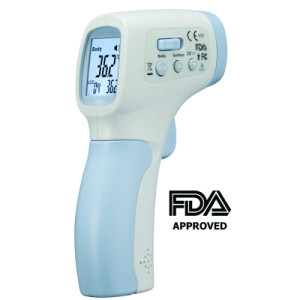
MEDI-Scan Infrared Forehead Thermometer

Non-Contact Forehead IR Thermometer is specially designed to take the body temperature of a person regardless of room temperature.

Ensure accurate and stable body temperature readings, which is particular efficient for quickly screening the temperature of groups of people, newborns and very young children.

From a distance of around 5cm all you have to do is point toward the forehead and read the temperature on the LCD screen.

  • FDA 510K certified
  • Selectable °C or °F scale
  • Selectable Body or Surface temperature
  • Set alarm value to sound alarm
  • Memorization of the last 32 measurements
  • Automatic Data Hold & Auto power off
  • Automatic selection range
  • Display Resolution 0.1°C (0.1°F)
  • Backlight LCD display
  • FCC / CE marked
           
Cat.No. Name Range EA    
1202-ACCD0478IR MEDI-Scan Forehead Infrared Thermometer, FDA Approved 32.0 to 42.5°C, 90.0 to 108.0°F $120.18
1/EA
Add To Favorites

The following items have been added to your cart:

Choose a favorite list for this item:

Catalog Number Description Price
$

Returns/Order support

Please fill out the form below if you want to request order support from Krackeler Scientific.


Quick Order

* Required


New Tariffs & Effects on Pricing

Tariff note: As we navigate the current environment of tariff surcharges and mid-year manufacturer price increases, we want to keep you informed. While we have avoided making specific decisions thus far, we anticipate that we will be forced to implement a cost adjustment policy to offset the fees we have already been absorbing. We are committed to transparency and moderation in this process.

800-334-7725
office@krackeler.com


Play Video

To Request a Quote

  1. Search or Browse for items and add to them to your Shopping Cart.
  2. Click the "Request Quote" button at the bottom of the Shopping Cart page.
  3. Fill out required fields.
  4. Optionally you can convert to standard checkout mode by choosing a payment type.
  5. Click "Request Quote" at the bottom of the page.

You will be contacted with a quote.

To Order From a Quote

  1. Register and login to the website.
  2. Receive a quote from your sales representative or customer service.
  3. Have your copy of the quote in hand.
  4. Visit our quote module to search for your quote.
Back to Top