
Advanced Search

Durac® Single-Channel Timer with 10-Button Input

By Bel Art Products
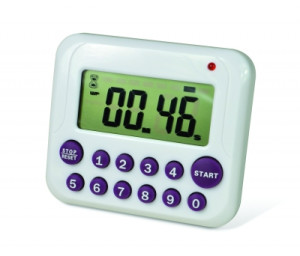
Durac® Single-Channel Timer with 10-Button Input
  • Ten button timer allows direct input for faster programming of desired time
  • Timing capacity: 99 minutes: 99 seconds
  • Count direction: up/down
  • Last time set memory
  • Audible and visual alarms; displays elapsed time after countdown
  • Mounting options: lay flat on bench, flip-open stand for vertical view, pocket clip for attachment to lab coat, magnetic back for metal surface attachment
  • Requires two AAA batteries (included)
  • Features a Certificate of Calibration and individual serial number, these electronic timers are tested and calibrated in H-B’s exclusive triple accredited/registered ISO/IEC 17025:2005, A2LA accredited laboratory (Cert #2448.01), against equipment whose calibration is traceable to NIST.
  • CE marked, RoHS compliant
               
Cat.No. Brand Name EA        
8-B61700-3500 Durac® Single-Channel Timer with 10-Button Input $27.55
1/EA
Add To Favorites Add To Favorites

The following items have been added to your cart:

Choose a favorite list for this item:

Catalog Number Description Price
$

Returns/Order support

Please fill out the form below if you want to request order support from Krackeler Scientific.


Quick Order

* Required


New Tariffs & Effects on Pricing

Tariff note: As we navigate the current environment of tariff surcharges and mid-year manufacturer price increases, we want to keep you informed. While we have avoided making specific decisions thus far, we anticipate that we will be forced to implement a cost adjustment policy to offset the fees we have already been absorbing. We are committed to transparency and moderation in this process.

800-334-7725
office@krackeler.com


Play Video

To Request a Quote

  1. Search or Browse for items and add to them to your Shopping Cart.
  2. Click the "Request Quote" button at the bottom of the Shopping Cart page.
  3. Fill out required fields.
  4. Optionally you can convert to standard checkout mode by choosing a payment type.
  5. Click "Request Quote" at the bottom of the page.

You will be contacted with a quote.

To Order From a Quote

  1. Register and login to the website.
  2. Receive a quote from your sales representative or customer service.
  3. Have your copy of the quote in hand.
  4. Visit our quote module to search for your quote.
Back to Top