
Advanced Search

Scilogex® Levo™ Manual Pipette Controllers

By Scilogex
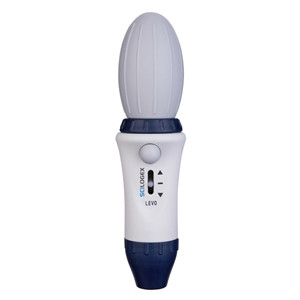
Scilogex® Levo™ Manual Pipette Controllers

Levo™ is an easy to use serological pipette controller for use with 1 - 100mL pipettes. Simply attach a pipette into the silicone holder and squeeze the bulb. The thumb lever controls both the aspirate and dispense speed. A press of the central button blows-out any remaing drops in the pipette. An easily replaceable 3µm hydrophobic filter prevents liquids from contaminating the inside of the Levo™. 50mL of liquid can be pipetted from one squeeze of the bulb.

  • Comfortable design
  • Precise pipetting control
  • Autoclavable silicone pipette holder
  • Supplied with integral and replaceable 3µm filter
  • Available in 5 colors
  • 3 year warranty

Scilogex® Levo™ Manual Pipette Controllers

           
Cat.No. Brand Name EA    
88-74010001 Levo™ Manual Pipette Filler, Blue $61.00
1/EA
Add To Favorites
88-74010002 Levo™ Manual Pipette Filler, Red DISCONTINUED  
88-74010003 Levo™ Manual Pipette Filler, Green $61.00
1/EA
Add To Favorites
88-74010004 Levo™ Manual Pipette Filler, Yellow DISCONTINUED  
88-74010005 Levo™ Manual Pipette Filler, Pink DISCONTINUED  

Accessories

           
Cat.No. Brand Name EA    
88-17000110 Levo™ Replacement 3µm Hydrophobic Filter $5.00
1/EA
Add To Favorites

The following items have been added to your cart:

Choose a favorite list for this item:

Catalog Number Description Price
$

Returns/Order support

Please fill out the form below if you want to request order support from Krackeler Scientific.


Quick Order

* Required


New Tariffs & Effects on Pricing

Tariff note: As we navigate the current environment of tariff surcharges and mid-year manufacturer price increases, we want to keep you informed. While we have avoided making specific decisions thus far, we anticipate that we will be forced to implement a cost adjustment policy to offset the fees we have already been absorbing. We are committed to transparency and moderation in this process.

800-334-7725
office@krackeler.com


Play Video

To Request a Quote

  1. Search or Browse for items and add to them to your Shopping Cart.
  2. Click the "Request Quote" button at the bottom of the Shopping Cart page.
  3. Fill out required fields.
  4. Optionally you can convert to standard checkout mode by choosing a payment type.
  5. Click "Request Quote" at the bottom of the page.

You will be contacted with a quote.

To Order From a Quote

  1. Register and login to the website.
  2. Receive a quote from your sales representative or customer service.
  3. Have your copy of the quote in hand.
  4. Visit our quote module to search for your quote.
Back to Top